Are you looking to enhance your online experience, optimize your screen brightness, and make night-time web surfing more comfortable? Look no further than one of the
best Chrome extensions
available. This article delves into a top-rated
Chrome extension
, which has garnered an impressive aggregate rating of 4.1 out of 5, focusing on
personalization
and enhancing your
online engagement
experience.
What sets this Chrome extension apart?
This extension, which falls under the category of
entertainment apps
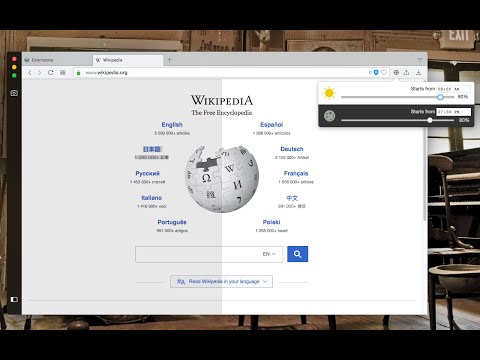
, allows users to control the brightness level of their screen for both daytime and nighttime periods, based on personal preferences. It's an outstanding feature for those websites that do not support the native dark theme. Even better, if you're facing websites that are too dark, this Chrome extension can increase their brightness, optimizing your viewing experience.
User Reviews and Feedback
Users have had mixed experiences with the extension. Positive reviews consist of users mentioning its ability to effectively control saturation and not give a strange yellow color like the default windows dimming. It's also been cited to be quite helpful in mitigating the brightness of screens for those who use
dark mode
on their OS and
Browser
settings. Negative feedback mainly revolves around the 'Disable Everywhere' button, which doesn't change its label after being pressed.
Users have also reported the extension breaking the baseline styles of some sites, like Twitter, requiring manual disabling for those domains. Other points of criticism include the insufficiency of the indication that the purpose of the button changed and the brightness slider not working when the on/off option is toggled too much.
Diving Deeper: The Features
Beyond the ability to control screen brightness, this top Chrome extension offers a suite of impressive features. Users can control the darkness level of all websites or just a single hostname, increase or decrease the brightness level of a website, and use keyboard shortcuts for every action. There is also the option to disable the extension on a single website or entirely and control the brightness level from 0% (completely dark) to 120% (20% brighter than the original).
How it Compares to other Chrome Extensions
Compared to other dark mode extensions such as "Dark Reader™" or "Turn Off the Lights™", this extension only injects a filter to reduce or increase the original brightness, not performing any resource-intensive operations or altering the website's styling. This makes it a more efficient and less intrusive choice for your screen brightness control needs.
Conclusion
Overall, this Chrome extension proves to be an incredible tool for enhancing your online experience and personalization needs. Despite a few minor interface issues, which can be easily addressed in future updates, it stands as one of the best Chrome extensions for controlling screen brightness and fostering a comfortable online engagement environment.













30 Reviews For This Extension
not working on netflix video errors
Works great, but after some time, like a year or more, it stopped working :( So I had to remove it and add it back again.
spectacular
it doesn't isolate the brightness to one webpage and doesn't work at times
ily... you stopped me from going blind
ok
It actually do not increases the brightness of your screen. What it actually do is put it more white...I mean, the small light bulbs on your screen doesn't actually bright more...So it doesn't make sense to install this extension.
Game changer for Oled laptop screen
works perfectly well
** READ 5 STARs ** I don’t know why there’s reviews saying that this extension doesn’t work for them, it works great for me. It’s the best extension I’ve found for this. I can make it as dim or as bright as I want to. I can also disable/enable it depending on each individual site with just a click of a button, and I can also disable the whole thing with just the click of a button. it also transfers to all of my tabs if I choose a setting, I don’t have to do each individual one. I’ve never had any issues with this!
Weirdly doesnt work for me at all
Doesn't dim videos on Chrome. I wish the developer could include the feature to reduce video brightness instead of just dimming the pages.
Seems complicated, tried it two ways and don't think it adjusts the brightness at all just puts a grey shade over it, don't like it, may revisit
it works very nice and correctly, thank you very much.
helps immensely
Very good so far. Congrats!
I found Adjust Page Brightness extremely helpful for my eyes. The interface is simple and easy to use, allowing me to instantly adjust brightness to my comfort level. It significantly reduces eye strain, especially during long screen hours. Overall, it's a lightweight and effective tool for daily use. Highly recommended! ?
Works good, at least in my opinion. It's not only effective but also simple to use.
awesome, been using it for 5+ years
Its work
Just wow
ui is a bit confusing and goes through a lot of iterations and updates which throws you off but at the end of the day it works and i use it pretty much every day so cant complain
good but don't deserve 5 starts people are over reacting!
I love this brightness so much cuz yes
I love this brightness so much cuz yes
good
Good user control I think this one better, it works well.
Good user control I think this one better, it works well.
Works, but Not... It can make the screen brighter, and some other darker.. nah.. it's not working.. you can't select one site or one widow for it...
Doesn't work for full screen video players.